
Building custom API integrations to automate the tedious parts of small business bookkeeping.
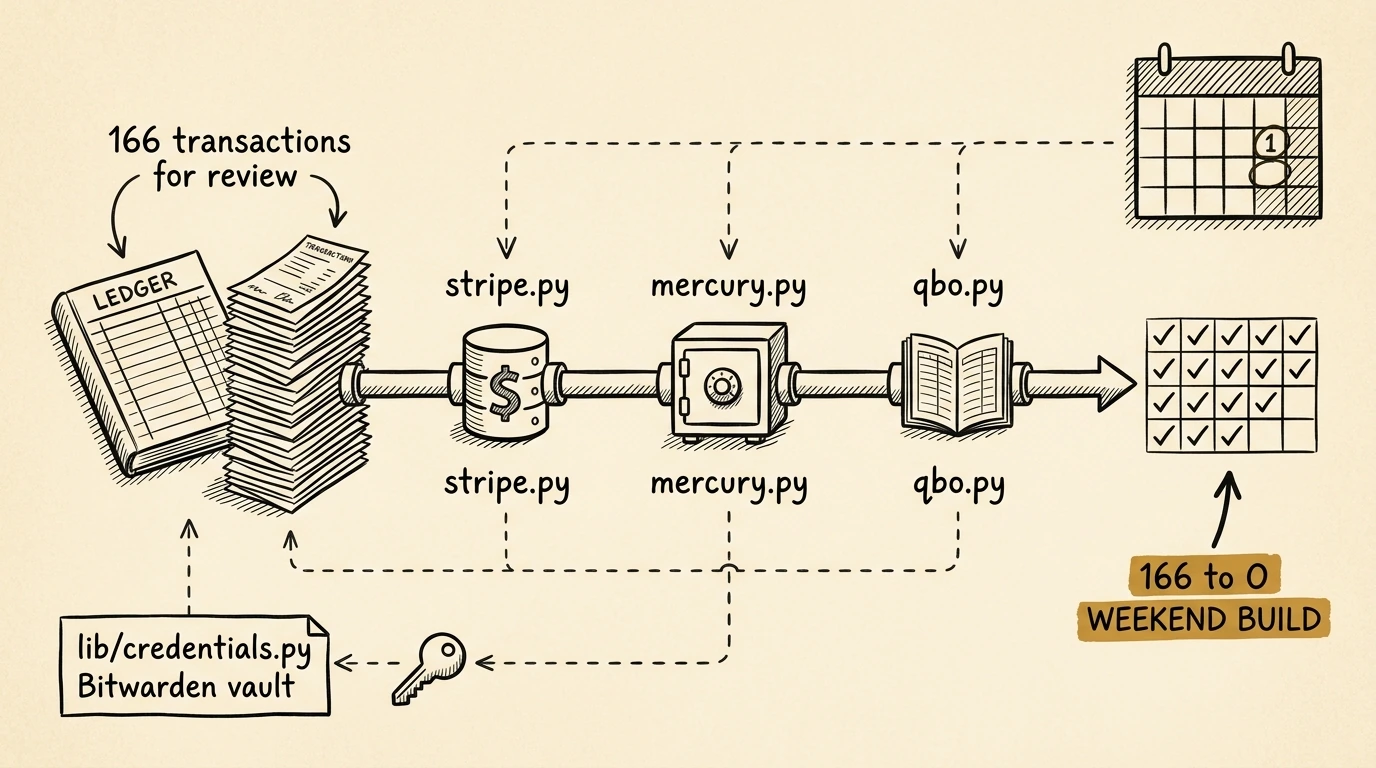
As a small business owner running a web hosting company, I’d accumulated a problem: 166 unreconciled bank transactions in QuickBooks Online. Every time I opened the app, I was greeted by a wall of Stripe deposits that didn’t match my invoice amounts, ads trying to upsell me on payroll, and a UI that seemed designed to maximize clicks.
I kept putting it off. Tax season was approaching.
Then I decided to see if Claude Code could help me build a better way.
The root problem
Stripe payouts don’t match invoice amounts. If a customer pays a $100 invoice, Stripe deposits $96.80 after its 2.9% + $0.30 fee. Worse, I have a Stripe Capital loan, so they withhold additional funds from each payout. And multiple invoices get batched into single deposits.
Manual reconciliation meant:
- Find the deposit in my bank feed ($1,443.19)
- Look up the payout in Stripe Dashboard
- Click through to see which invoices it included
- Calculate the fee breakdown
- Create a split transaction in QuickBooks
- Repeat 50+ times
I needed automation.
The first discovery: you can’t API your way out
My first instinct was to use the QuickBooks API to process the bank feed programmatically.
Claude Code helped me research the API thoroughly and discovered a critical limitation: bank feed transactions in “For Review” status are not accessible through the QuickBooks Online API. Intuit uses third-party services (Plaid, Yodlee) for bank data and doesn’t expose it.
This meant I couldn’t just write a script to auto-categorize everything. But I could solve a different problem: creating the deposits that QuickBooks needs to match.
Building the integration layer
Over a weekend, I worked with Claude Code to build three Python skills that talk to each other:
Stripe skill
./stripe.py payout po_1ABC123...Returns the complete breakdown: which charges were included, fees by type, and any Capital deductions.
Mercury skill
./mercury.py match-stripe $1443.19 --date 2026-01-15Finds the corresponding bank deposit, confirming the money actually arrived.
QuickBooks skill
./qbo.py reconcile --payout po_1ABC123...Creates a proper QBO Deposit that links the WHMCS payments, splits out fees to the correct expense account, and records the Stripe payout ID for audit trail.
The magic is in how they chain together. The reconcile command:
- Calls the Stripe API to get payout details
- Parses charge descriptions to extract WHMCS invoice numbers
- SSHs to my WHMCS server to look up the QBO Payment IDs
- Checks if those payments are already deposited (skips duplicates)
- Creates a properly structured Deposit via QBO API
The result
Running ./qbo.py reconcile processed all my outstanding Stripe payouts in about 30 seconds. Each one created a deposit with linked payments (maintaining the WHMCS→QBO audit trail), fee deductions posted to “Payment Processing Fees,” and a private note with the Stripe payout ID.
Then I could go into QuickBooks, click “Match” once per transaction in the bank feed, and it would instantly find the corresponding deposit I’d just created.
166 transactions cleared. P&L ready for tax prep.
What I learned
1. API limits are usually deliberate. Intuit doesn’t expose bank feed data for good reasons (security, cost, third-party agreements), and understanding why helped me design around it.
2. The hybrid approach works. API for heavy lifting, browser for final confirmation. The one-click “Match” in QuickBooks is actually pretty good when you’ve already created the deposits programmatically.
3. Credentials matter. I built a shared lib/credentials.py that talks to Bitwarden. Every script unlocks the vault once, caches the session, and retrieves API keys securely. No hardcoded secrets.
4. Make it auditable. Every deposit includes the Stripe payout ID. If something looks wrong months later, I can trace it back to the source.
The tax prep payoff
With reconciliation complete, generating my P&L for the tax preparer was one command:
./qbo.py pnl --start 2025-01-01 --end 2025-12-31I formatted it in a Google Sheet with proper accounting format (bold headers, dollar signs, parentheses for negatives) and sent it off. A task I’d been dreading for weeks took 20 minutes.
Would I do it again?
Building these skills took maybe 8 hours of focused work. But that’s 8 hours once, versus 4+ hours every month of manual reconciliation. And tax season will never be a scramble again.
The tools are now part of my workflow:
- →
./qbo.py reconcileruns weekly - →
./qbo.py pnlgenerates monthly reports - →
./stripe.py feestracks my payment processing costs